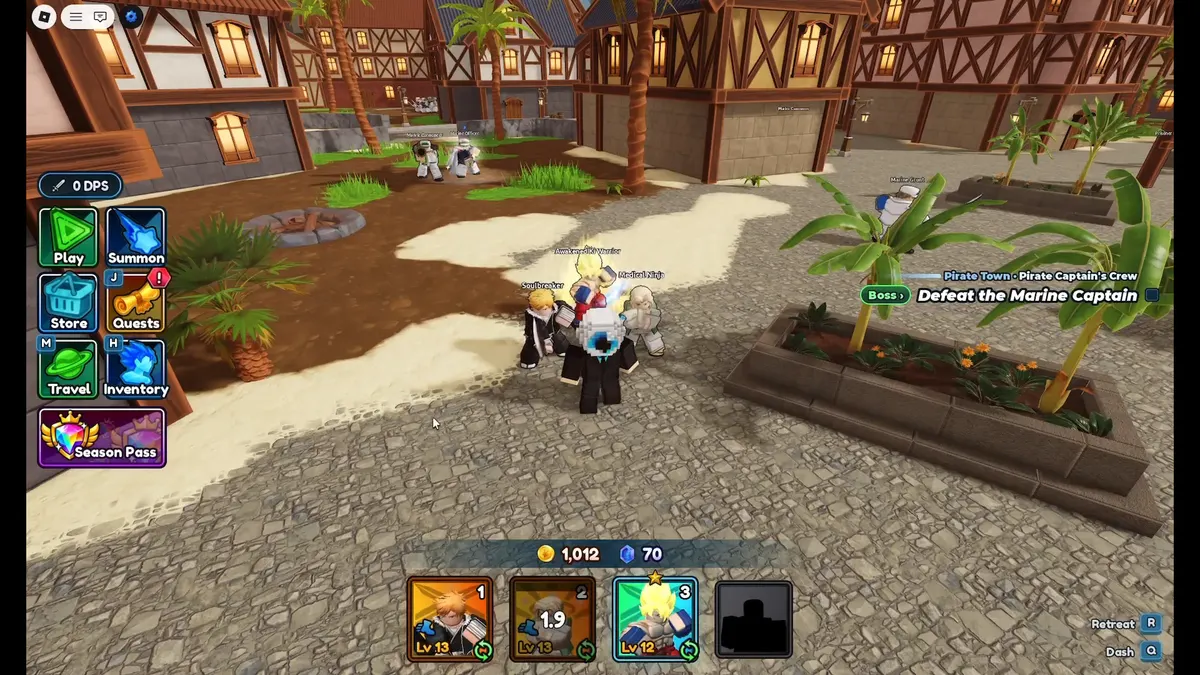
What is on the Anime Champions X HUD
On 18 November 2026, eight days before release, daireb posted a 30-second video in the official sneak-peeks channel with the caption “It’s important not to forget where you come from... HUD reveal :)”. Every earlier clip had the interface hidden. This one shows it, in a town of timber-framed houses and palm trees.

- Left side: a DPS readout, then six buttons: Play, Summon, Store, Quests, Travel and Inventory, with a Season Pass button under them. Quests, Travel and Inventory carry the key hints J, M and H.
- Bottom centre: two currencies, a gold coin (1,012 in the clip) and a blue gem (70), above a squad bar with four slots numbered from 1. Three slots hold characters at level 13, 13 and 12; the fourth is an empty silhouette. One slot shows a cooldown counting down from 1.9.
- Right side: the current quest, “Pirate Town · Pirate Captain’s Crew”, with a Boss tag and the objective “Defeat the Marine Captain”.
- Bottom right: Retreat on R and Dash on Q.
The settings menu, line by line
The clip opens the settings window, which has a search box and four tabs: Audio, Effects, Interface and Controls.

| Setting | What the game says it does | Shown set to |
|---|---|---|
| Music volume | Background music and ambience. | 100 |
| Sound effects volume | Combat, ability and menu sounds. | 100 |
| Graphics | Balance quality and FPS. | Auto (High) |
| Damage numbers | Numbers over hits and heals. | All |
| Camera shake | Shake on big moments like summons. | On |
| Screen effects | Impact frames and flashes. | Mine |
| My effects | Ability effects from your squad. | On |
| Other players’ effects | Ability effects from other squads. | On |
| UI style | Change how the UI looks. | Normal, Pro or Nostalgic |
| DPS meter | Your team’s damage per second in fights. | On |
| Hide HUD | Press F1 on a keyboard to toggle it. | Off |
| Auto sprint | Always sprint; hold Shift to walk. | Off |
The Controls tab is longer than the clip shows; Auto sprint is the only control on screen before the window closes.
Normal, Pro and Nostalgic UI styles
The UI style dropdown has three options. The clip starts in Normal, with large blue and green buttons, then switches to Nostalgic. The settings window turns from blue to yellow at once, and the HUD changes with it.

In Nostalgic the coins and gems move from above the squad bar to the left edge, the six menu buttons shrink to small icon squares with orange outlines, and the quest moves into a boxed panel. That layout is the caption’s point: it is the look of Anime Champions Simulator, the 2023 game this one follows. The Pro style is in the list and is not shown.
What the HUD reveal confirms
- You field a squad. The settings call it “your squad” and “your team”, and the bar has four slots. The 16 November clip showed characters fighting around the player; this shows where they are managed.
- Characters have levels and are summoned. Each slot shows a level, and there is a Summon button. What a summon costs, and the odds, are not shown.
- There is a Season Pass and a Store. Prices and contents are not shown.
- There are named areas and boss quests. Pirate Town is the first area named in official footage.
- The release date has not moved. The clip ends on the logo and “Releasing November 26th”.
No character is named in the clip, so the tier list stays unranked, and no code box is visible in any menu shown; the codes page has what is known.
Sources
- Official Anime Champions X Discord · announcements, sneak-peeks and server-news channels, read 27 November 2026
- Roblox public web APIs & live game verification · read 28 November 2026